Skip to content
+ Add Your Logo
INVOICE
#
Item Quantity Rate Amount
$
$0.00
$
$0.00
Subtotal $0.00
Tax
%
Total $0.00
Amount Paid
$
Balance Due $0.00

Template

Standard
Spreadsheet

Theme

Saved Invoices (0)

No saved invoices yet

Create and save your first invoice

INVOICE

#001
Bill To
Balance Due $0.00
Item Quantity Rate Amount
Subtotal $0.00
Total $0.00
Balance Due $0.00

What is an invoice?

An invoice is a document sent by a seller to a buyer to request payment for a product or service. It usually includes important details like the items or services provided, the total amount, payment terms, invoice date, and due date. In simple words, an invoice is a record of what was sold, how much needs to be paid, and it also helps while filing taxes.

How to create an invoice using our Invoice generator?

Creating professional invoices with our free invoice generator is simple. You can easily create invoices by simply following a few steps and customizing them based on your business needs.

Step 1: Choose the Invoice Template

Start by selecting the invoice template that best suits your business. After that, choose your preferred color theme and upload your business logo to make the invoice look more professional and branded.

Step 3: Products or Services

Enter the product or service provided in the item description table. The invoice generator automatically calculates the rates based on the input rate and quantities. It also applies tax, discount, and shipping charges if applicable. If needed, you can also add terms or notes for extra information.

Step 2: Business and Customer Details

Fill in your business name, address, and other important details. Then enter the customer billing and shipping information, along with the invoice number, date of invoice, and due date.

Step 4: Download the Invoice

Once everything is completed, you can download and save the invoice as a PDF. You can also print it easily and send it to your customer.

Sample Invoice Template

A standard professional invoice contains the following key components:

Business & Customer Info

Your business logo, name, and address, paired with your customer’s billing and contact information.

Line Items & Descriptions

A clear, itemized list of the products or services provided, including quantities and individual rates.
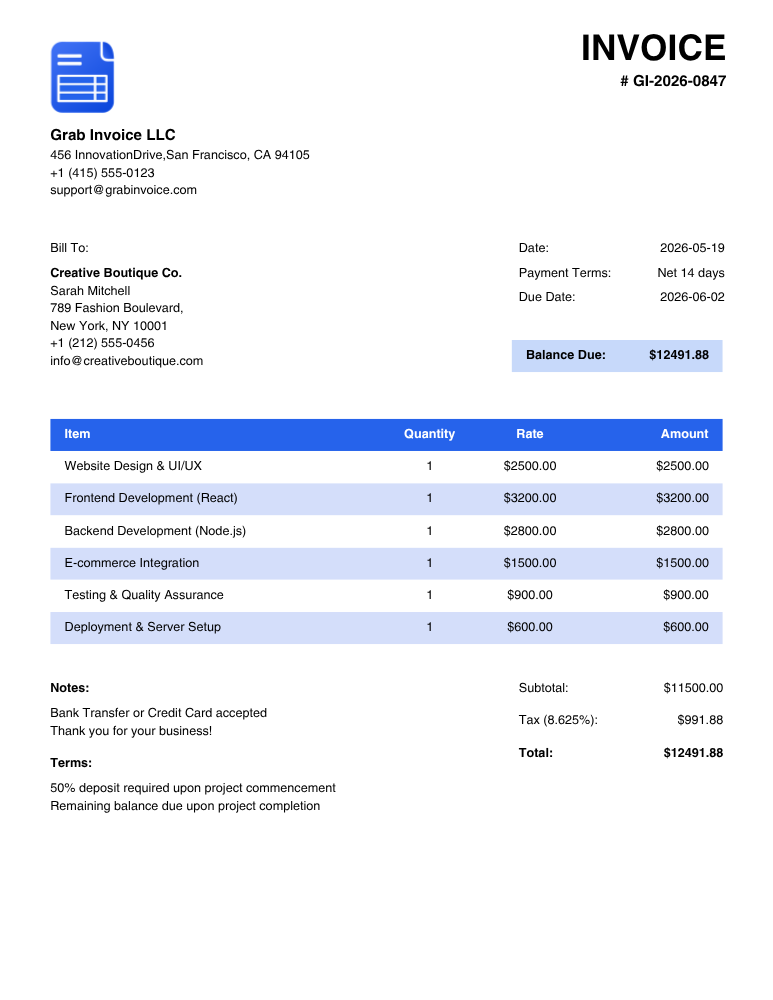
Grab Invoice Template Layout Example

Invoice Details

The unique, sequential invoice number, the date of issue, and the designated payment due date.

Totals & Taxes

The subtotal of all items, applicable taxes, shipping or discounts, and the final balance due.